
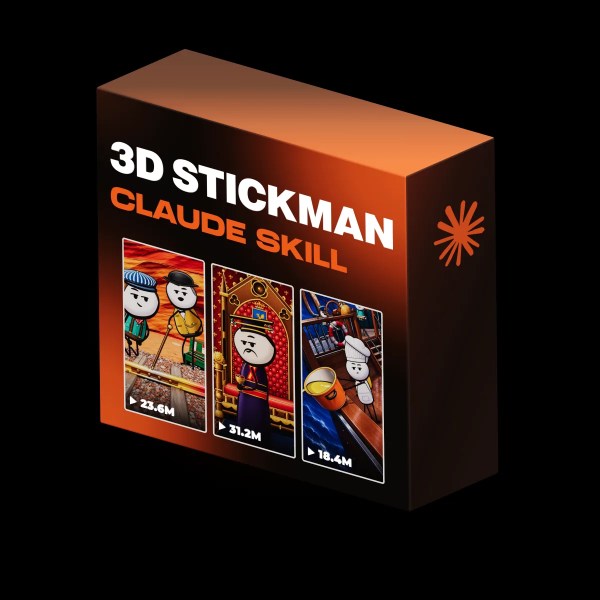
 FREE
🎬 Turn Any Story Into a Viral Stickman Cartoon Short! Create viral-style stickman explainer videos in minutes with the 3D Stickman Skill for Claude. Simply share an idea, a script or an existing video, and Claude writes the script, designs your characters, builds 3D toon worlds, animates every shot to the narration, and turns everything into a ready-to-post 9:16 MP4 video. ✅ 2D stickman characters in fully 3D toon worlds ✅ Viral script formula with hook, escalation and payoff ✅ Optional character and environment designs with Higgsfield or OpenArt ✅ Recreate any existing video in the stickman style ✅ No drawing, animation, or video editing required Share your idea, let Claude do the work, and download your finished short! Read more
Product Description
🎬 3D Stickman Skill — Turn Any Story Into a Narrated Stickman Cartoon Short
The 3D Stickman Skill is a Claude Skill that turns a story idea, a script or an existing video into a finished vertical cartoon short featuring 2D stickman characters in fully 3D toon worlds. It's built on the exact format behind the viral stickman explainer shorts:- Flat 2D stickmen with bean-shaped heads, dot eyes and thin ink-stroke limbs.
- Hand-painted 3D environments with ink outlines, warm light and violet shadows.
💡 What Does the 3D Stickman Skill Do?
Share an idea, and Claude handles the entire process:- Writes a fast-paced narration script with a hook, escalation and payoff.
- Designs your characters and locations in the stickman house style.
- Times every shot to the narration.
- Builds each location as a real 3D toon scene.
- Animates every character as a 2D rig that stays grounded while the camera moves.
- Adds camera push-ins, punch-ins, transitions and cartoon effects.
- Exports a ready-to-post 9:16 MP4 video.
⏱️ Built for Short-Form Content
The 3D Stickman Skill follows the same fast-paced format used in viral stickman explainer videos. Every script opens with a paradox hook, builds through escalating beats and pivots into the explanation with "You see," before landing a short ironic payoff. A fast, steady narrator with almost no pauses keeps viewers watching, while slow camera pushes and punch-ins on key words keep every shot moving. Video duration:- Standard video: approximately 60 seconds.
- Shorter test clips: available on request, for example 10 seconds.
🎨 Smart Story Development & Character Design
Before animating anything, Claude plans your story and the look of every shot. Story & script:- Writes the script to a proven viral formula.
- Verifies factual claims and clearly labels fiction.
- Shows the word count and estimated duration for your approval.
- Generate character sheets and environment plates in Higgsfield.
- Get the prompts and generate them yourself in OpenArt or Higgsfield.
- Upload your own images, or choose a simpler code-only build.
- Requires your approval for every asset and shows the credit cost before generating.
🔁 Recreate an Existing Video
Already have a video you love? You can use it as the starting point. Claude analyzes the source video, maps out its story, beats, characters and locations, and locks the story before rebuilding it in the stickman style. You can then choose to: "Keep the original cast and setting, change the characters, change the environments, or both" Before delivery, Claude compares matching frames side by side with the original to check depth, scale, camera and colours.⬇️ Automatic Animation & MP4 Export
The 3D Stickman Skill doesn't just write scripts. It also builds your finished animation automatically. Claude creates an editable Remotion project for your short. From this project, you can:- Watch an animated Preview of your short.
- Request changes to individual shots without starting over.
- Adjust timing, camera moves and characters.
- Export your final MP4 in 1080x1920 at 30 fps.
🎙️ Voiceover & Custom Voice Options
Every short is built around a fast, steady narration. Want to use your own voice instead?- Copy the approved script from Claude.
- Record it yourself or generate it in ElevenLabs or Higgsfield with your preferred voice.
- Upload the narration to Claude.
- Claude aligns every shot to your recording.
📋 Requirements
Before starting, make sure you have:- Claude with Skills enabled: Claude Desktop, Web, or Code, with code execution available to build the Remotion project.
- Optional AI image provider: Higgsfield MCP connected to Claude, or OpenArt / Higgsfield on their websites, if you want generated character sheets and environment plates.
- Generation credits: Only needed if you choose to generate images; Claude shows the cost before every generation.
- A narration: Your own recording or a voice generated with an AI voice tool.
- Optional: ElevenLabs if you want to create the voiceover with your own or a custom voice.